Predictive Maintenance
Wear and irregular patterns get flagged before they cause a breakdown.
One system that schedules your floor, predicts machine failures before they happen, and shows you a live digital twin of every line — built for people who run production, not just report on it.
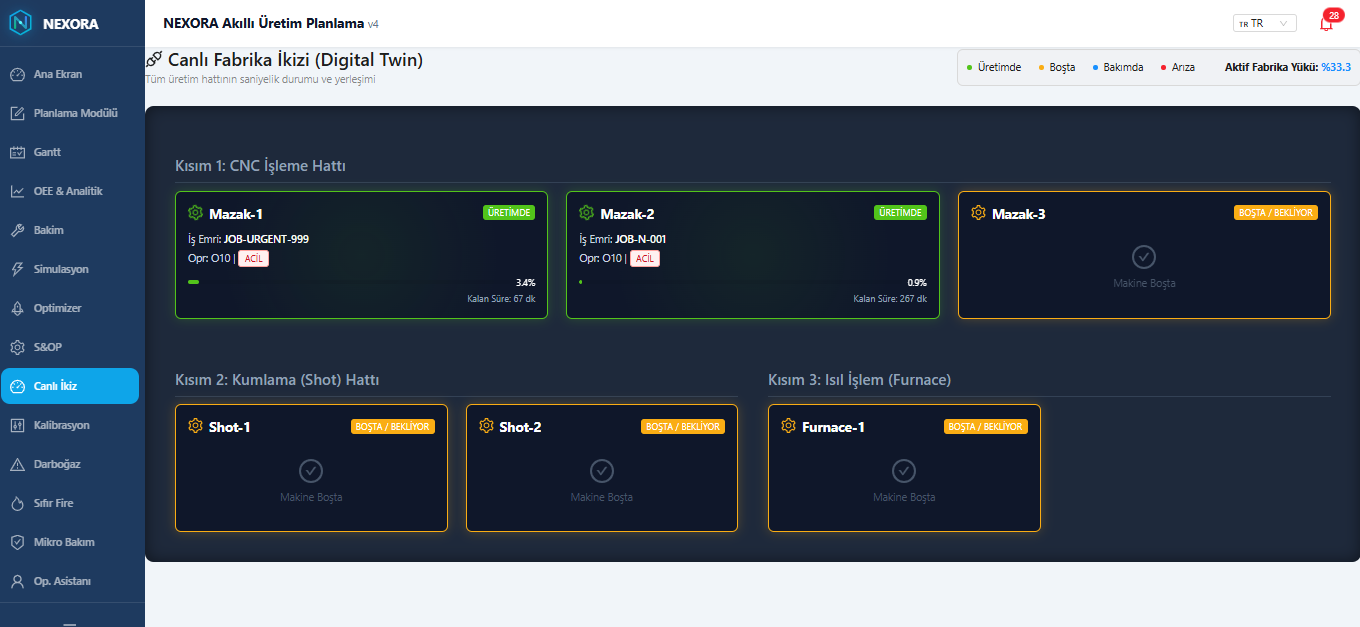
Live Digital Twin — actual Nexora interface, not a mockup
Scheduling, maintenance, machine tracking and your existing ERP — connected instead of scattered across spreadsheets.
Wear and irregular patterns get flagged before they cause a breakdown.
Jobs grouped by tooling and material so changeovers get shorter.
Real-time status and OEE for every machine, not last week's report.
The right supervisor gets notified immediately, not at the next meeting.
Connects to the ERP and stock systems you already run.
Ask "why was line 3 behind today?" and get a straight answer.
Six specialized agents watch your floor around the clock. These are real screens from the Nexora app — not mockups.
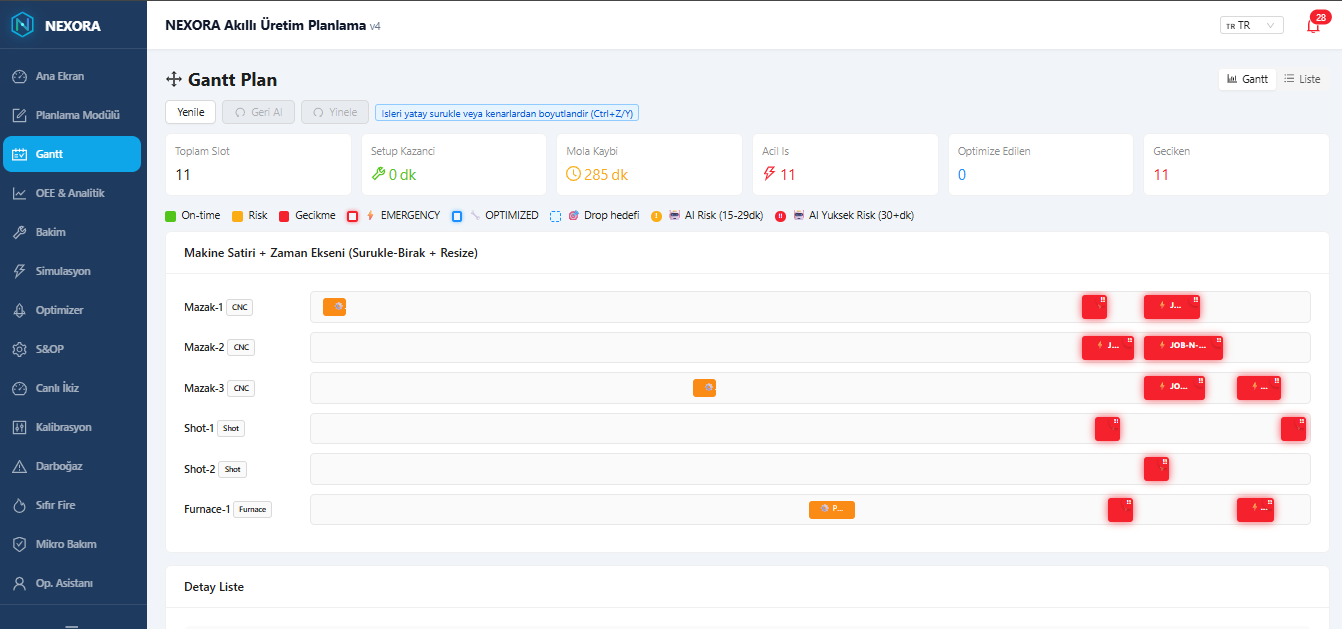
Drag, drop and resize jobs on a live Gantt board. The engine cuts setup time by 35%+ by sequencing similar jobs together, and re-plans in under 30 seconds when a breakdown or rush order hits.
Tracks utilization on every machine in real time and shows exactly which one is holding up the line — and what today's idle time is actually costing you.
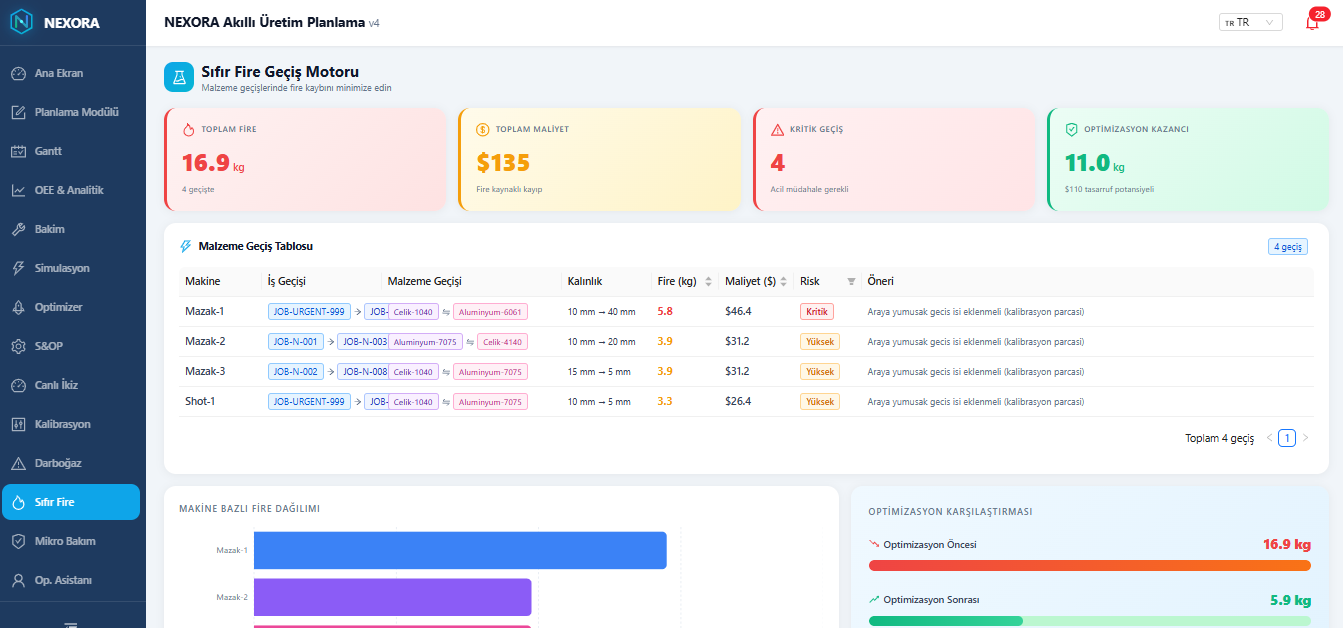
Flags high-risk material transitions between jobs before they happen, and suggests the buffer step that keeps scrap — and cost — down.
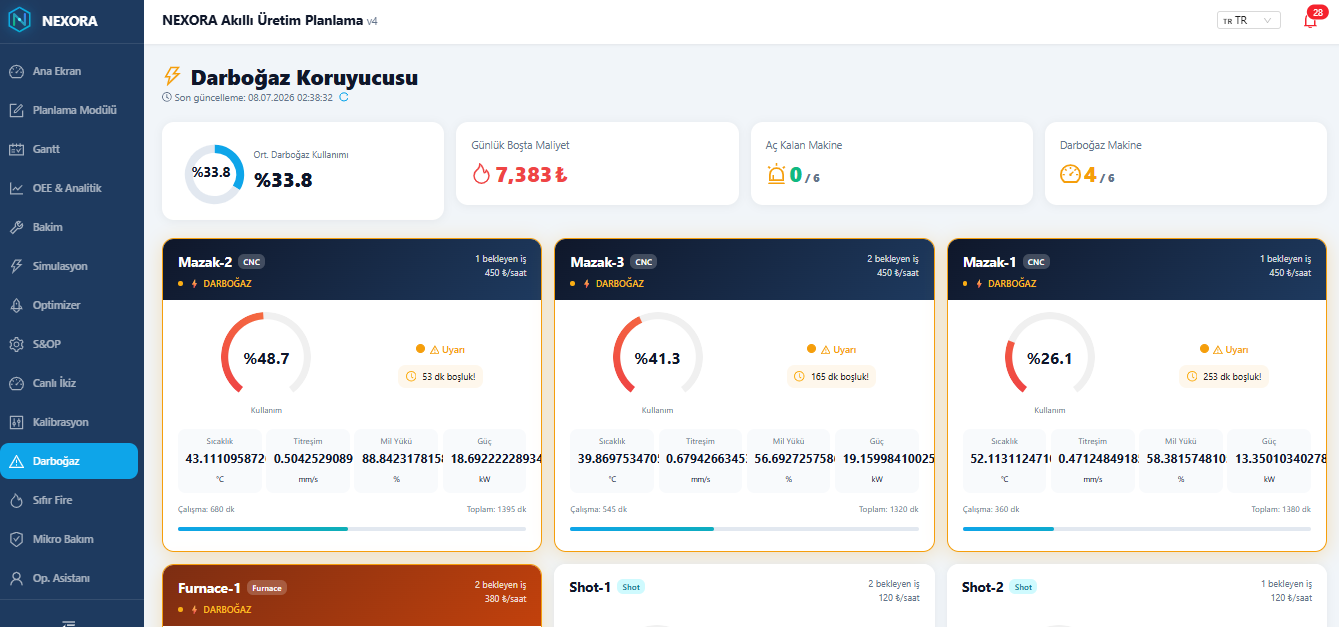
Scores failure risk per machine from live sensor data, and slots a short maintenance window into an existing setup gap — instead of stopping the line later.
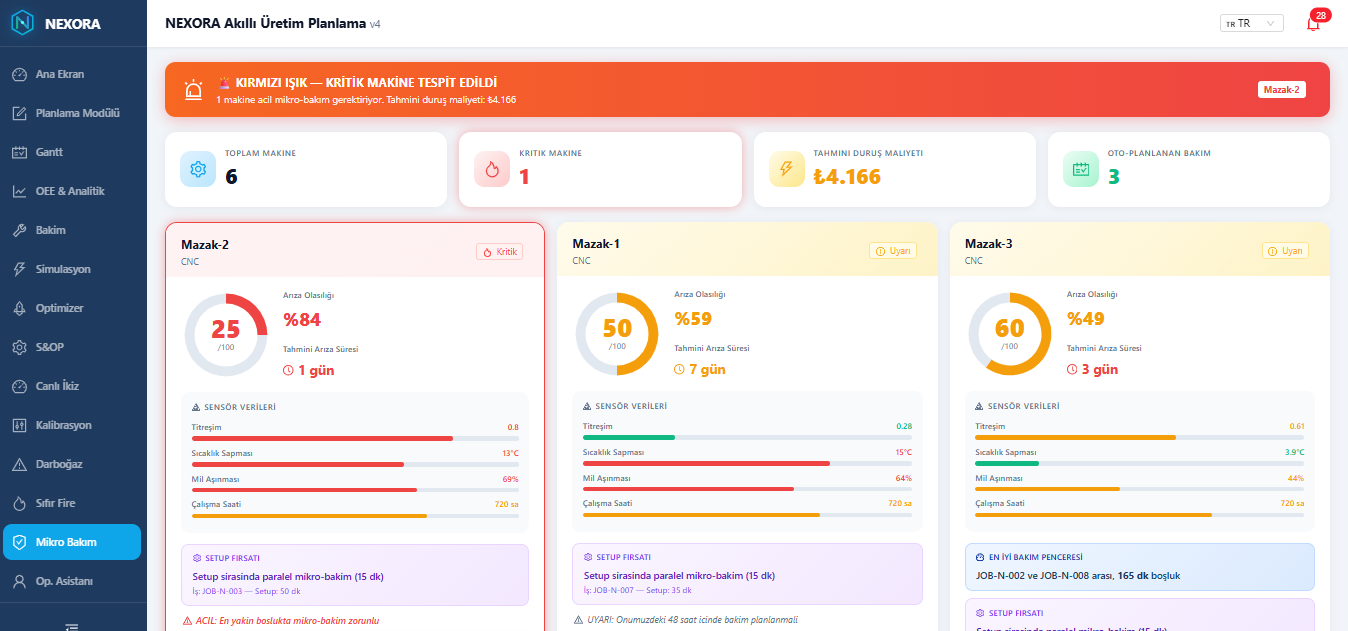
A second-by-second view of every line and machine — running, idle, in maintenance or down — laid out the way your floor is actually laid out.
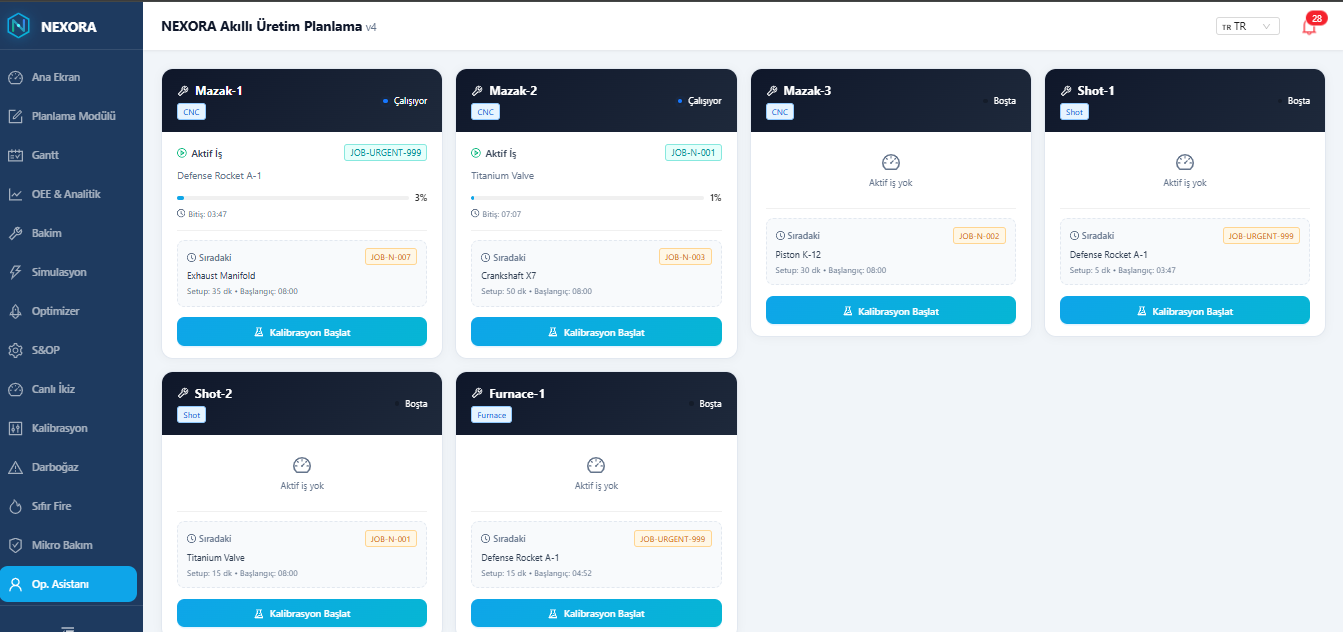
The screen your operators actually use: active job, progress, what's next, and a one-tap way to start calibration — no training manual required.
The full product story in one polished PDF — use cases, the AI engine flow, measurable gains and technical specs. Perfect for forwarding to your production or finance manager.
Free download — no form, no email required.
Import from Excel or enter orders in the Planning Module. Before it builds a single slot, the engine counts backward from each due date to flag what won't make it in time — while there's still time to react.
The engine sequences jobs in three passes — emergency jobs (under 4 hours to due) first, then same-part runs that cut setup time in half, then everything else by earliest due date. Fixed break times and maintenance windows are factored in from the start.
The plan gets one last drag-and-drop pass on the Gantt board. Once approved, each machine gets its queue and each operator gets a Start / Pause / Complete terminal screen.
When load between same-type machines drifts past 120 minutes, the system suggests a rebalance — you approve it, nothing moves on its own. Actual shop-floor data feeds back into OEE and the delay/breakdown predictions.
Nexora sits between your machines and your ERP — it adds a layer, it doesn't replace one.
Your shop floor data is sensitive. Nexora is built to treat it that way by default.
Every request runs through an Nginx SSL reverse proxy, and sessions are authenticated with JWT tokens — no plaintext traffic, no shared passwords.
EU-based cloud hosting or a fully on-premise deployment for sensitive environments.
Operators, supervisors and admins each see exactly what their role needs — nothing more.
Your production data is yours. Export it or delete it whenever you choose.
Enter your own numbers — the math runs on your data, not a brochure case study.
Based on the engine's 35% setup-time reduction. Your actual results depend on your job mix — that's exactly what the early access pilot measures.
Test It With Your DataNexora is in early access. The people who join now shape what gets built next.
Your feedback goes straight to the development queue — you tell us what to build next.
Whatever rate you join at now, you keep — even after Nexora officially launches.
Early users get direct setup support from the team building the product, not a support queue.
Early access spots are limited while we onboard shops one at a time.
A typical setup goes from kick-off to your first live dashboard in about 5–10 business days, depending on how many machines you connect.
No. Nexora sits between your machines and your ERP, and syncs with the system you already use — it adds a layer, it doesn't replace one.
Yes. Data is encrypted in transit and at rest, and enterprise customers can choose EU-based hosting or a fully on-premise deployment.
Any machine with a PLC, MTConnect or OPC-UA interface, plus manual stations via tablet — we're building compatibility with common brands like Mazak, DMG, Haas, Trumpf and Amada.
Early access is open now. Join the list below and we'll reach out directly to set up a walkthrough.
Join the early access list — locked-in pricing and a direct line to the team building it.